
K116 Game Download APK & Start Playing Online in 2026

Description
K116 Game is a mobile gaming platform designed for users who want to enjoy online games through a simple and convenient interface. The platform focuses on easy navigation, account management, and mobile-friendly access for everyday users.
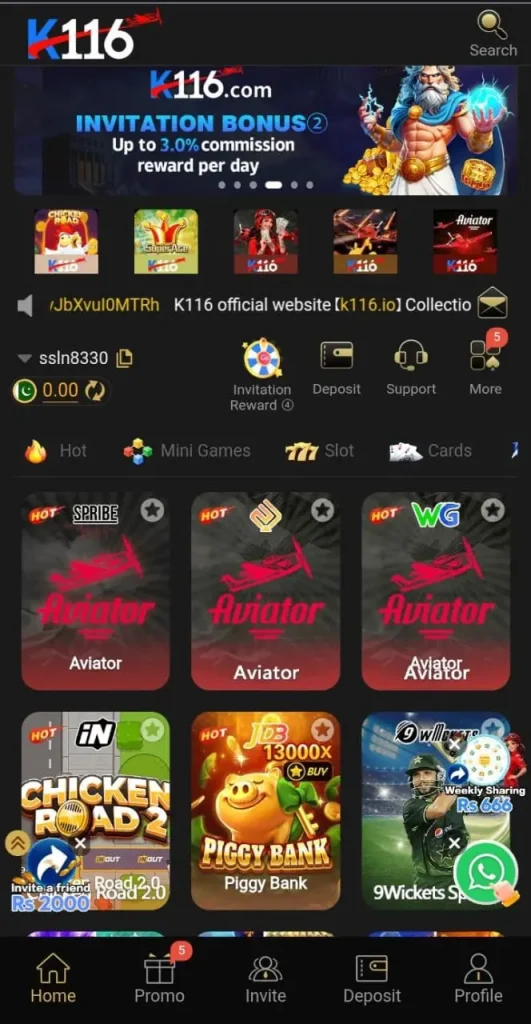
For Pakistani and South Asian players, K116 Game offers a straightforward way to explore its available gaming sections and manage account-related activities. Users can download the application, create an account, and explore the available options according to their preferences.
What Is K116 Game and How Does It Work?
K116 Game is an online gaming application that can be accessed through compatible mobile devices. Its interface is designed to keep important sections easy to find, allowing users to move between different parts of the platform without unnecessary complexity.
The K116 platform may include gaming and account features that require users to register before access. New users should first understand the available options, account rules, payment information, and any applicable requirements before using the platform. You can try more games like 88dd game and h789 game.
K116 Free APK Download for Android Users
The K116 Free APK is intended for Android users who want to install the application directly on their smartphones. Before starting the K116 Download process, it is important to obtain the APK from a source that you trust.
Android users should also check their device storage, internet connection, and compatibility before installation. Since APK files can be installed outside the official app-store environment, users should carefully review the file source and requested permissions.
K116 Game Features Worth Exploring
K116 Game provides several practical features aimed at making mobile gaming easier to manage. Some notable aspects include:
Mobile-Friendly Design: The interface is arranged for smartphone screens, making navigation more comfortable on different Android devices.
Easy Account Access: Users can create an account and use their login details to return to the platform when needed.
Quick Section Navigation: Important areas can be accessed without moving through too many unnecessary menus.
Payment Management: The platform includes sections for handling available deposit and withdrawal-related activities.
Simple Game Interface: Gaming sections are presented in a way that can be easier for new users to understand.
Account Controls: Users can manage basic account information and review relevant activity through their profile.
More Reasons to Explore K116 Game
One useful aspect of K116 Game is its focus on a simple mobile experience. Users do not necessarily need a complicated setup to explore the main sections of the application.
The platform can also be convenient for people who prefer using their smartphones for online gaming. A stable internet connection can help pages and gaming sections load properly, while keeping the application updated may provide a smoother experience when newer versions are released.
Users should remember that gaming outcomes can vary and that any real-money activity involves financial risk. It is sensible to use only an amount that you can afford to lose and to follow the platform’s applicable rules.
How to Download K116 Game on Android?
Android users can follow these general steps when installing the application:
- Open the trusted source where the K116 APK is available.
- Download the latest compatible APK file.
- Wait until the download finishes completely.
- Open the downloaded APK from your phone’s file manager.
- If Android asks for permission to install an APK from that source, review and enable the required setting.
- Start the installation process.
- Wait for the installation to complete.
- Open K116 Game and proceed with registration or login.
Always check the APK file before installation and avoid installing files from suspicious sources.
Installing K116 Game on an iPhone or iPad
The installation process on iOS is different from Android because iPhones generally do not use APK files.
If an official iOS version or supported web access is provided by the platform, users should follow the instructions supplied through that official method. Do not try to install an Android APK on an iPhone because APK files are designed for Android devices.
Adding Funds to Your K116 Account
If the platform provides a deposit option, users can generally manage funds through the account’s payment section.
- Log in to your K116 Game account.
- Open the wallet, deposit, or funds section.
- Select an available payment option.
- Enter the required amount.
- Carefully review the transaction details.
- Complete the payment through the provided method.
- Check the account balance after the transaction is processed.
Payment availability can depend on the platform and the user’s location, so always check the current options shown inside the account.
How to Request a Withdrawal from K116 Game
Users who want to withdraw available funds should first check whether their account meets the platform’s withdrawal requirements.
- Sign in to your K116 Game account.
- Go to the withdrawal or wallet section.
- Select an available withdrawal method.
- Enter the amount you want to request.
- Check the account or payment details carefully.
- Submit the withdrawal request.
- Keep the transaction information for your records.
Processing times and requirements may vary, so users should review the current withdrawal conditions before submitting a request.
Creating Your K116 Game Account
Getting started usually requires basic registration information. A simple registration process may include these steps:
- Open the K116 Game website or application.
- Select the registration or sign-up option.
- Enter the requested information.
- Create a secure password.
- Review the provided details before submitting.
- Complete any verification step if required.
- Log in using your registered details.
Users should keep their login information private and avoid sharing passwords or account credentials with other people.
K116 Game: Advantages and Limitations
Pros
- Simple interface for mobile users
- Easy account navigation
- Android APK access where available
- Convenient account and payment sections
- Suitable for users familiar with mobile gaming platforms
Cons
- APK installation requires additional care
- Availability of payment methods may vary
- iOS installation depends on official platform support
- Real-money gaming can involve financial risk
- Users should verify current platform rules before making transactions
Final Thoughts on K116 Game
K116 Game offers a mobile-focused way to explore online gaming through an easy-to-understand interface. Its account, gaming, and payment sections are designed to keep common activities accessible to smartphone users.
For anyone considering a K116 Download, checking the APK source, device compatibility, account requirements, and payment conditions should come first. Responsible use is also important, particularly when real money is involved. Users should understand the platform before depositing funds and should never spend more than they can comfortably afford to lose.
Frequently Asked Questions About K116 Game
What is K116 Game?
K116 Game is an online gaming platform designed for mobile users, with gaming and account-management features accessible through compatible devices.
Where can I get K116 Free APK?
Users should obtain the K116 Free APK only from a source they trust and should check the file carefully before installing it on an Android device.
Is K116 Game available for Android?
The K116 platform can be accessed through an Android APK where an official or trusted compatible version is provided.
Can I use K116 Game on iPhone?
iOS users need to follow the platform’s supported iPhone or web-access method. Android APK files cannot be installed directly on iOS devices.
How can I add money to K116 Game?
If deposits are supported, users can open the account’s payment or wallet section, choose an available method, enter the amount, and follow the displayed instructions.
How do I withdraw money from K116 Game?
Users can open the withdrawal section, choose an available method, enter the requested amount, and submit the transaction after checking the required details.